Welcome to Password-Free Logins!

Tired of remembering passwords? With our CordialTec Email OTP plugin, your users can login or register using just their email address and a secure code sent to their inbox. No more forgotten passwords!
What This Plugin Does
- No Passwords Needed: Users login with a code sent to their email.
- Super Secure: Every code is unique and expires quickly.
- Works Everywhere: Looks great on phones, tablets, and computers.
- Easy Setup: Get started in just a few minutes.
- Remember Me Feature: Stay logged in on trusted devices for 30 days.
Getting Started
Step 1: Install the Plugin
- Go to your WordPress dashboard
- Click on “Plugins” → “Add New”
- Click “Upload Plugin” and select the cordialtec-email-otp.zip file
- Click “Install Now” and then “Activate”
Step 2: Create Your Login Page
- Go to “Pages” → “Add New”
- Give your page a name like “Login with Email”
- In the content area, type: `[cordialtec_email_otp]`
- Click “Publish”
Step 3: Set Up Redirects (Optional)
1. Go to “CordialTec Email OTP” → “Settings” in your admin menu
2. You can set where users go after:
– Logging in (default: homepage)
– Registering (default: homepage)
– Logging out (default: homepage)
3. Click “Save Changes”.
How Your Users Will Use It
For New Users (Registration):
1. Visit your login page
2. Enter email address → Click “Request OTP”
3. Check email for 6-digit code → Enter code → Click “Verify OTP”
4. Account is automatically created → Taken to specified User page, or defaults to Homepage!
For Returning Users (Login):
- Visit your login page
- Enter email address → Click “Request OTP”
- Check email for 6-digit code → Enter code → Click “Verify OTP”
- Logged in successfully → Taken to their destination!
Remember Me Feature
Users can check “Keep me logged in for 30 days” to:
Stay logged in on trusted devices
Avoid entering OTP on every visit
Automatically login when returning to the site.
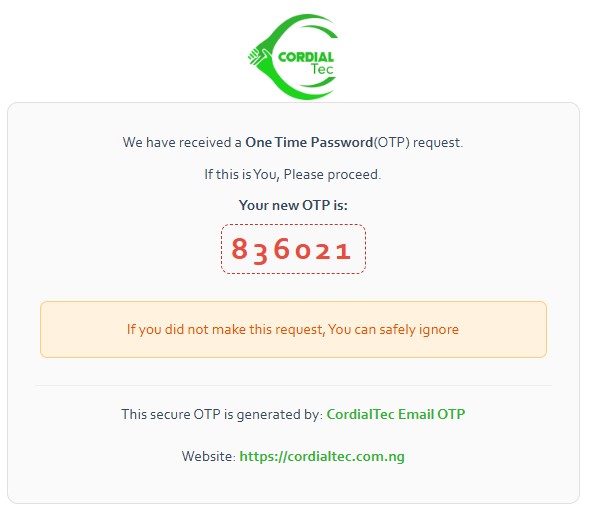
What the Emails Look Like
Your users will receive beautiful, professional emails that include:
Your website logo and name.
A clear 6-digit code.
Simple instructions.
Security reassurance.
Customization Options
Changing Where Users Go
You can easily change where users are redirected after login, registration, or logout in the plugin settings.
Styling the Form
The form automatically matches your website’s style, but if you want to make changes, you can add custom CSS to your theme.
Troubleshooting Help
Emails Not Arriving?
- Check your spam folder first
- Make sure your WordPress can send emails
- Contact your hosting provider if issues continue
Code Not Working?
- Codes expire after 10 minutes for security reasons, and for your protection.
- Request a new code if it’s been too long.
- Make sure you’re entering all 6 digits correctly.
Form Not Showing?
- You might already be logged in!
- Try logging out first
- Make sure the shortcode “[cordialtec_email_otp]” is on the page
Need Help?
We’re here for you! Contact our support team:
Email: info@cordialtec.com.ng
Website: https://cordialtec.com.ng
Phone: 08032884596
Why You’ll Love This Plugin
Thank you for choosing CordialTec Email OTP! We’re excited to help you create a smoother, more secure login experience for your website visitors.